Smart Suggestions: How the AI Guides Your Tendering Journey
Never ask 'what next?' again. See how our AI's Page-Aware suggestions provide the right guidance at the right time, from discovery to submission.
The End of Procurement Friction
One of the biggest hurdles for SMMEs is simply not knowing what questions to ask. On a complex platform like Tenders-SA.org, knowing which document to upload or how to interpret a closing date can be overwhelming. That's why we built 'Smart Suggestions'—a proactive guidance system that anticipates your needs based on where you are in your journey.
Most small business owners in South Africa don't have a dedicated procurement department, a compliance officer, or a bid-writing team on staff. Often it's the founder, an office manager, or a bookkeeper who is expected to juggle tender research alongside invoicing, staffing, and the dozen other jobs that keep a small business alive. Every minute spent trying to figure out where to click, what a 'functionality score' means, or which annexure is mandatory is a minute not spent on the actual work of preparing a competitive bid. Smart Suggestions exists to close that gap—to put the platform's own expertise directly in front of you, exactly when you need it, instead of leaving you to hunt through help articles or guess.
Why Guidance Matters More in Tendering Than in Ordinary Software
Most software gets easier to use the more you use it. Tendering is different: every tender is its own small bureaucracy, with its own evaluation criteria, its own returnable documents, and its own quirks of phrasing. A business that has submitted fifty bids can still be caught off guard by the fifty-first, because government departments, municipalities, and state-owned entities don't always structure their requirements the same way. This unpredictability is precisely why static help pages fall short. A generic FAQ can tell you what a 'B-BBEE certificate' is in the abstract, but it can't tell you, in the moment, whether the specific tender you are viewing right now requires one, or whether your current certificate level is even sufficient. Smart Suggestions is built to answer the specific question, on the specific page, at the specific moment you're asking it—even if you never type a word.
Understanding 'Page-Awareness'
Our AI Assistant isn't just a static window on the side of your screen. It is constantly 'Page-Aware'. Through the generateSuggestions method in our ai.service.ts, the assistant updates its capabilities in real-time as you navigate from your dashboard to a specific tender or application form.
In practice, this means the assistant is reading the room the same way a good colleague would. If you've just landed on your dashboard after logging in, it knows you're probably orienting yourself and looking for what's new or urgent. If you've clicked into a specific tender, it knows you're now evaluating fit and requirements. If you've opened an application form, it knows you're in execution mode and need help finishing rather than exploring. This contextual shift happens automatically, without you having to tell the AI where you are or what you're trying to do—it already knows, because it's watching the same screen you are.
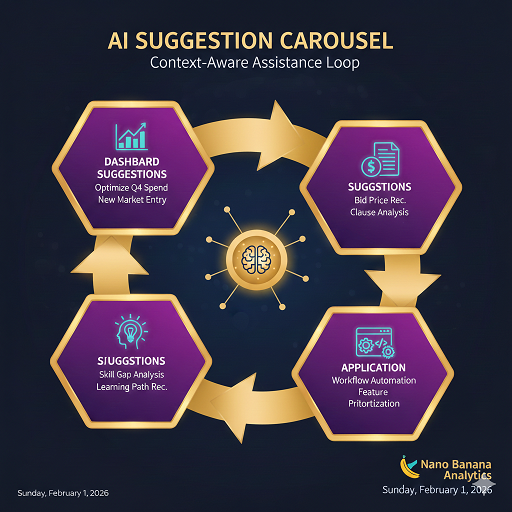
How AI suggestions morph to meet your needs on different pages.
The 4 Main States of AI Guidance
Depending on which part of the Tenders-SA.org platform you are viewing, the AI will offer tailored shortcuts to speed up your work:
- The Dashboard (Discovery State): Focuses on discovery. It suggests: 'Show me my best matches' or 'What applications are due soon?'
- Tender Detail (Analysis State): Focuses on requirements. It suggests: 'Am I eligible for this tender?' or 'What documents do I need to prepare?'
- Application Form (Action State): Focuses on completion. It suggests: 'Help me write the executive summary' or 'Check for missing documents.'
- Company Profile (Optimization State): Focuses on readiness. It suggests: 'How can I improve my matching score?' or 'Explain the impact of my BBBEE level.'
These four states aren't arbitrary—they map directly onto the natural lifecycle of a tender opportunity as it moves through your business. You discover it, you analyse whether it's worth pursuing, you act on it by preparing your submission, and in the background you're continuously optimising your profile so that future opportunities are even better matched. Smart Suggestions simply makes each of those stages visible and actionable, rather than leaving you to intuit what to do next on your own.
A Walkthrough: Following the Suggestions From Discovery to Submission
To see how this works end-to-end, imagine a small IT services company logging into their dashboard on a Monday morning. Here is roughly how a session guided entirely by Smart Suggestions might unfold:
- Log in and land on the Dashboard. Instead of scrolling through every listed tender, the owner clicks the suggested prompt 'Show me my best matches', which immediately narrows the view down to opportunities ranked for their specific industry and province.
- Open a promising tender. The suggestion bar shifts into Analysis State. A single click on 'Am I eligible for this tender?' surfaces a plain-language comparison between the tender's stated requirements and the company's own profile data.
- Check the paperwork. Still on the tender page, the owner clicks 'What documents do I need to prepare?' and receives a checklist tailored to that specific tender rather than a generic list of 'documents tenders usually need'.
- Start the application. Moving into the Application Form, the suggestion bar changes again to Action State. 'Help me write the executive summary' gives the owner a starting structure to work from instead of a blank page.
- Tidy up before submitting. A final click on 'Check for missing documents' catches an outstanding tax clearance certificate before the deadline, not after.
Notice that at no point in this walkthrough did the business owner need to know the right question to ask, or even know that a 'functionality checklist' or 'executive summary' was something they should be thinking about. The suggestions carried them through each stage of the process in the right order, at the right time.
Zero-Prompt Productivity
The beauty of Smart Suggestions is that you don't even have to type. Often, the answer you need is just a single click away. This 'Zero-Prompt' approach reduces friction for busy business owners who need information quickly without becoming AI experts.
This matters more than it might first appear. Many people are still hesitant to type open-ended questions into an AI chat box—they aren't sure how to phrase things, or they worry about wasting time on a question the system won't understand. By turning the most useful questions into a single visible click, Smart Suggestions removes that hesitation entirely. You're never staring at a blank input field wondering where to start. You're choosing from a short, relevant menu that was written with your current situation in mind.
Making Smart Suggestions Part of Your Weekly Routine
The businesses that get the most value from Smart Suggestions tend to treat it as a habit rather than an occasional novelty. A short list of practices can help you build that habit:
- Start every session on the Dashboard. Even if you already know which tender you're chasing, letting the AI show you 'best matches' first can surface an opportunity you hadn't considered.
- Ask the eligibility question early. Clicking 'Am I eligible for this tender?' the moment you open a listing saves you from investing hours in a bid you were never positioned to win.
- Revisit your Company Profile suggestions periodically. As your BBBEE level, certifications, or capacity change, the Optimization State prompts will change too—so it's worth checking back even when you aren't actively bidding.
- Use the Action State prompts as a first draft, not a final answer. Suggestions like 'Help me write the executive summary' are designed to get you moving, but your own knowledge of the client and the project should always shape the final submission.
Guidance That Supports Judgement, Not a Replacement for It
It's worth being clear about what Smart Suggestions is and isn't. It is not a decision-maker that tells you which tenders to pursue or guarantees a win. It is a navigational aid—one that reduces the time you spend figuring out where to look and what to do, so that more of your time and energy can go into the parts of tendering that genuinely require human judgement: pricing your bid competitively, describing your unique value to the buyer, and building the relationships that keep your pipeline full. The AI narrows the search space and removes friction; you still make the calls that determine whether a bid is worth submitting and how strong it should be.
Conclusion
Digital tools should make your life easier, not more complicated. By building an AI that is aware of your context and proactive in its help, Tenders-SA.org is removing the guesswork from government and private sector procurement. Start navigating with confidence—your AI guide is already one step ahead.
Tags
Based on this article's topics, here are some current tenders that might interest you
SUPPLY, DELIVERY, INSTALLATION, COMMISSIONING, VALIDATION, AND USER TRAINING FOR A CONTINUOUS FLOW ANALYSER (CFA)
INVITATION BID NUMBER: CPSC/B/306/2026 OUTSOURCING OF SERVICE PROVIDER FOR SUPPLY AND DELIVERY OF 800M3 X G1 CRUSER RUN/BASE COURSE, 1300M3 X G5 GRAVEL FILL AND 1200M3 X G7 SUB-BASE MATERIAL FOR COMBAT TRAINING CENTRE LOHATLA. THE PROCUREMENT PLAN NUMBER: DOD PROC PLAN 26-27/SA ARMY/2387
Department of Justice and Constitutional Development KZN:(Dundee, Vryheid, Charlestown, Utrecht, Glencoe and Dannhauser) Magistrate Court: Completion of Installation of water tanks and booster pumps.
Want to see all available tenders?
Browse All Tenders →Share this article
Smart Suggestions: How the AI Guides Your Tendering Journey
Never ask 'what next?' again. See how our AI's Page-Aware suggestions provide the right guidance at the right time, from discovery to submission.